

There are a number of reasons we want to reduce the number of PDFs on Yukon.ca. All of these reasons share one thing in common - they negatively impact the user experience.
PDFs overwhelm Yukon.ca search results
If you've ever searched for anything on Yukon.ca you will see the search results are often inundated with documents. While the documents are relevant to the keywords people search for, they can push more relevant results down the list of results.
Presenting information out of context
On Yukon.ca we want people to land on an information page first. This is the page that connects users to everything related to the topic. They can get the important information about the program or service. Then they can branch out to the related information.
If a user goes straight to a PDF, they don't see the contextual, and often important information. For example, if a person searches for an application form and they go straight to the PDF, they could fill it out and submit it, but not realize they needed to add supporting documents.
People do not like PDFs
We know from first-hand observations during usability testing and user feedback that people do not like PDFs. They are not shy about telling us how they feel! Their expressions typically fall into one of two categories.
Pity
User research participants in this category are polite. Their tone and the words they use evoke pity. The poor government doesn't know people prefer information to be on a webpage. Maybe they don't have enough staff? Maybe they aren't aware there are better options in this modern age? What a shame.
Anger
User research participants in this category are on a mission. If they are on the brink of completing a task and land on a PDF, they are not happy about it and they don't mind telling us. This group accuse the government of burying or hiding important information. They suggest the government does this on purpose to make it harder to find. For a group with little patience, already suspicious of the government - this experience further errodes their trust and confidence in the government.
A sentiment shared by both of these groups is the government needs to do better. "How hard is it to put this on a webpage?"
Accessibility
PDFs are not an accessible ways to present content online and they don't often meet the government's accessibility standard.
- They do not work well with screen readers because text is not structured. This means the content is presented out of order, appears as a single block of text or users see a message something like, "alert: empty document."
- If the pdf is a scanned document - it's really a large image. This makes the content unreadable unless the person publishing the pdf manually applies OCR.
- Styling is fixed. This means it is not easy to make the font size larger or alter the foreground and background contrast.
Slow to load
Another accessibility factor to consider is that PDFs load slower than web pages. This may affect people who live in areas where there is less bandwidth. It is also forces people to use up their data by making them download content that could have been on a web page.
PDFs are written for print
People consume content differently if it is printed or published online. Printed materials are something people will sit with and read. They read top to bottom and left to right. When people are online they scan webpages in an "F" pattern. They do not read every word. They look for keyword(s) and then will more closely look at the content that relates to the task at hand.
PDFs are meant to be printed and read. When you publish them online, you're using a format that doesn't align with how people behave online. This makes it difficult for them to consume the content.
Keeping online content up-to-date takes time
PDF content is often outdated
We are good at adding content to Yukon.ca and not quite as good at removing older content. This is especially true with PDFs.
A person using site search or a search engine might land on an older version of an application or article. The information could be outdated. For example a deadline date or eligibility criteria. This could result in mistakes and delays accessing a government digital service.
In another instance, the person might see they are on an older version of the PDF, but they might not know where to get up-to-date information. They might question if the older version is correct or not - we want users to be confident they are always accessing the most current information.
PDF content can differ from the program or service webpage
If you're the person responsible for your program's online content, you know how challenging it can be to make sure everything is up to date. When you have the same content on a webpage or webpages and in PDF it is easy to miss something. And it can create problems for the end users. For example, if the deadline to apply on the webpage is different than the deadline to apply in the PDF - which is the source of truth?
It's much easier and takes less time to publish the information in one place. And users will always be confident they have the correct information.
Broken links
Links in PDFs can be out of date and easily broken. If a user lands on the PDF and believes it is the source of truth and half the links don't work, it makes for a terrible user experience.
Publishing content in PDF makes it difficult for people to find
We want content about the government's programs and services to be discoverable and easy to find. PDFs can be optimized for search engines just like traditional web pages with keywords and metadata. The only problem is people who create the PDF don't always optimize them. This makes is less likely they will show up in search results.
Navigating PDFs is difficult
Content inside PDFs is not as easy to search for. If a person manages to find a PDF with the information they want, they have the added challenge of looking for a specific piece of information.
People need more than a table of contents
Most PDFs have no internal navigation. This makes it:
- difficult for people to get their bearings and understand what content is available in the PDF;
- time consuming and challenging for people to scan to find the keywords that match the task or information they're interested in;
- hard to recover if they make a mistake. They have to reset each time.
"But people can just use Control or Command + F"
One defence of using PDF I have heard from staff is that people can use Control or Command + F to search for a word. I agree that some people may know how to do this. In almost 30 years of doing this work, I have only come across a few research participants who knew about or tried this method of finding content in a PDF.
PDFs can interrupt the user journey and make for an inconsistent user experience
When we design digital services we want to create a consistent user experience across all service channels and platforms. It is important they know where they are and how to get back if needed. When people use a website and click into a PDF, they can experience what NNG call "cause disorientation."
Cause disorientation describes how people struggle to stay oriented with where they are and how to get to where they were before. They describe the following usability issues for people who do not notice when they transition to a PDF.
The best option is to add the content to a webpage so the user doesn't encounter either scenario.
PDFs do not display well on mobile devices
PDFs are not responsive. Most visits to Yukon.ca come from people using mobile devices. Last year we saw 502,420 visits from mobile deices compared to 493,911 visits from desktops. If these users interacted with a PDF, their experience would be one of constant zooming in and out and scrolling back and forth to take in the content. Even though Adobe has optimized PDFs for reflow, the original document has to be intentionally designed. In most cases the people who create PDFs do not know to optimize them for reflow.
People report issues trying to open PDFs
If you manage your department's website and related PDFs you've probably fielded calls from colleagues and the public letting you know they can't open it. You will test it out and get the people around you to test it out and find it does load. Mis-renderings and viewer-specific bugs are not uncommon with PDFs. This makes it challenging to help the person on the phone who experiences these issues. Often the only solution is to ask them to come to the office to pick up a paper copy.
Lack of data interoperability
When you look at content in a PDF - the formatting and layout look perfect.
If you've ever tried to copy and paste data from a PDF you've experienced the lack of data interoperability firsthand. You've had to correct the line spacing breaks and redo the formatting. This is inconvenient because it takes time and it can also result in mistakes or errors.
Copying tabular data into a spreadsheet is just as messy and in some cases may require specialized code.
Another example is how an improperly redacted document looks redacted, but the underlying text can still be searchable.
How many PDFs are on Yukon.ca?
When we launched Yukon.ca in 2018 we had migrated 649 PDFs to the website. 2020 saw the most PDFs at 5,439. Since that time we've reduced the number of PDFs by more than half (2,239) in 2025. And we'll continue to work toward our goal of further reducing this number over the coming years.
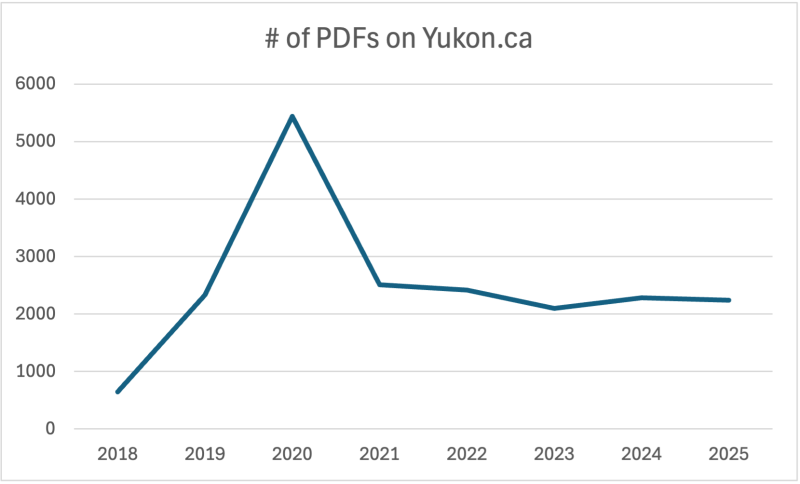
Number of PDFs on Yukon.ca by year
These numbers are reflected in the chart above.
- 2018: 649
- 2019: 2,334
- 2020: 5,439
- 2021: 2,506
- 2022: 2,418
- 2023: 2,097
- 2024: 2,280
- 2025: 2,239
Get help removing your PDFs off Yukon.ca
If you're interested in learning how we can support you to remove PDFs from Yukon.ca, start by reaching out to your department's communication team to get started. They will help you:
- determine where the content belongs;
- what format it should be in; and
- rewrite the content so it meets the reading grade level and other writing for the web standards.