

From time to time eServices gets calls from government employees thinking about removing content from Yukon.ca. This can be a knee-jerk reaction to a complaint from the public or confusion around the content. Staff have this reaction because they work hard to serve the public and if things don't work as intended it can be alarming.
We recently encountered this with some municipal election applications on Yukon.ca. The Yukon is in the midst of a territorial election. This means citizens are looking for information about the election online. One of the tasks they're undertaking is to apply for a special ballot.
In the Yukon, the lead for programs and delivering services can fall on municipal, First Nation, territorial or federal governments. This means citizens don't always know where to go for information. They often land on Yukon.ca - the Government of Yukon's main website.
The problem
We had a call from an employee concerned with reports that 1-2 people had found themselves on a Government of Yukon form for applying for a special ballet. This form is only for municipal elections - not territorial elections. They were concerned people might use the wrong form and get in a position where they were not be able to access the voting option that works for them.
They were advised to remove municipal election forms from the website temporarily to avoid confusing the public. The person who contacted me wasn't sure about this option and wanted to know the best approach and what their options were.
Put yourself in the shoes of your users
At this point all we knew about users were 1-2 reports that people were downloading the wrong forms. I wanted to understand more about what people might be seeing when they look for information about special ballots online.
We focused on one page for special ballot applications and we tested a variety of search terms in Google and on Yukon.ca. Our goal was to understand what they might see so we could then determine what we could do to help them avoid making a mistake.
5 minute user research
We spent a few minutes entering keywords into Google and Yukon.ca searches to see where they'd take us and determine the likelihood people might land on the Yukon.ca page rather than the correct place - the Elections Yukon website.
Google search
The top search results when searching for "special ballot" and "special ballot Yukon" included Elections Canada, Elections Yukon, City of Whitehorse and Yukon.ca. We tested the links to the Elections Yukon website and they took us to news releases with no information or links to apply for a special ballot. The links to the City of Whitehorse and the Elections Canada pages made it clear they were not going to be helpful which left one search result from Yukon.ca. This link went straight to a PDF form and not a document download page.
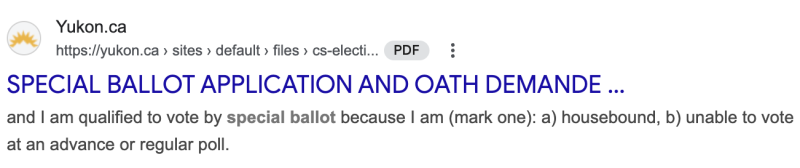
What does this tell us?
Based on the quality of the search results, there's a good chance people would open the Yukon.ca form and assume it's the right one.
- The title of the form is misleading - people may scan and see Yukon and special ballot.
- The direct link to the PDF is not ideal. Users are not presented with important information that tells them what the form is for.
- There is nothing obvious on the PDF to indicate it's only for municipal elections. You see the Yukon logo on the left and the title of the form on the right - SPECIAL BALLOT APPLICATION AND OATH.
Yukon.ca search
The Yukon.ca search immediately brought up the document download page for the special ballot application which is a good thing. The only problem was the page title - Special ballot application and oath, could be misleading.
What does this tell us?
If a person doesn't know they are searching in the wrong place - they would assume this is the correct application form.
- The title is misleading.
- The text that appears below isn't very helpful.
- When they click on the PDF - there is nothing on the form that makes it really obvious the form is for municipal elections.
Putting ourselves in our users' shoes helped us understand the sources of possible confusion and what we might do to help people.
A closer look at the document download page
Now that we understood more about the user experience, we looked at the page to see what options were available to make improvements.
Page title
The page title could be very confusing for people who don't know that Elections Yukon is the place to fill out the special ballot for territorial elections. The page title was, "Special ballot application and oath." We suggested they update the page title to, "Special ballot application and oath for Yukon municipal elections."
Re-direct traffic to the Elections Yukon website
Next we looked at options to re-direct traffic to the Elections Yukon online form to apply for a special ballot. Our preference was to use an in-page alert that would appear at the top of the document page. It would only stay up for the duration of the territorial election and then it would come down.

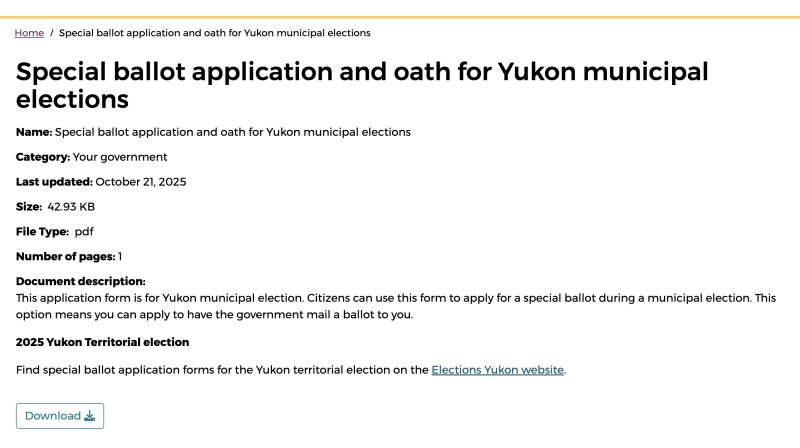
If this did not meet the criteria for an in-page alert, the next best option we recommended was to add the information to the document description field. See the bottom of the page in the following screen shot.
Publishing the updated document pages
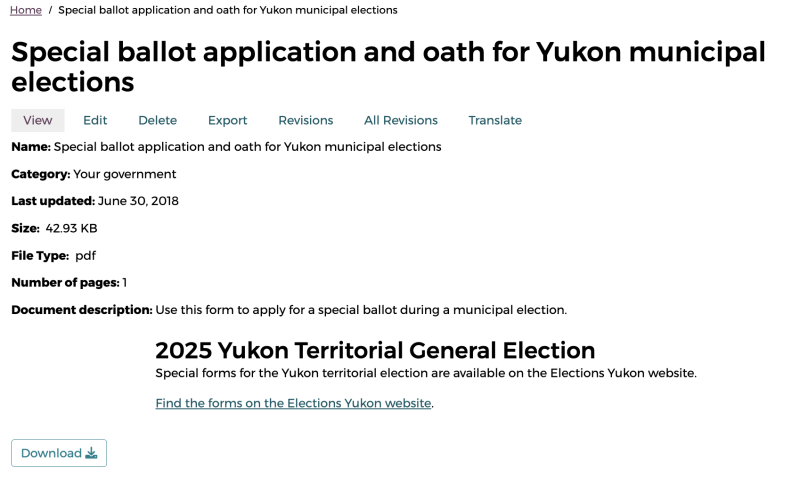
After we presented the options and shared mock-ups with the program they worked with their communications team to implement them. They landed on updating the page title and including a link back to the Elections Yukon website under the Document description.
Research and solution before you react
I am really glad I heard from the program area so I could learn more about the problem, we could go over solutions together and we could give them solid advice to apply to improve the user experience. In less than 15-minutes we were able to conduct some user research and create mock-ups the team could take and implement. And now we can see if those changes made a difference.
From now until the election we'll monitor user feedback and analytics on these document pages to make sure we've achieved our objective to get people to the source of truth. We expect to see low, or no negative user feedback on these pages and we expect to see people who land on the pages either click on the link to go to the Elections Yukon website or possibly click the link to open the form for municipal elections.
We'll share our findings with you in an upcoming post.